Find your way around the iPhone app
Know where to find your bookings, entry pass and personal details.
Before you begin
Have your registered email ready. The member app and staff back office serve different roles; a trainer should use Staff access for work.
What to do
Open the installed URĀ app and sign in with the email registered with reception.
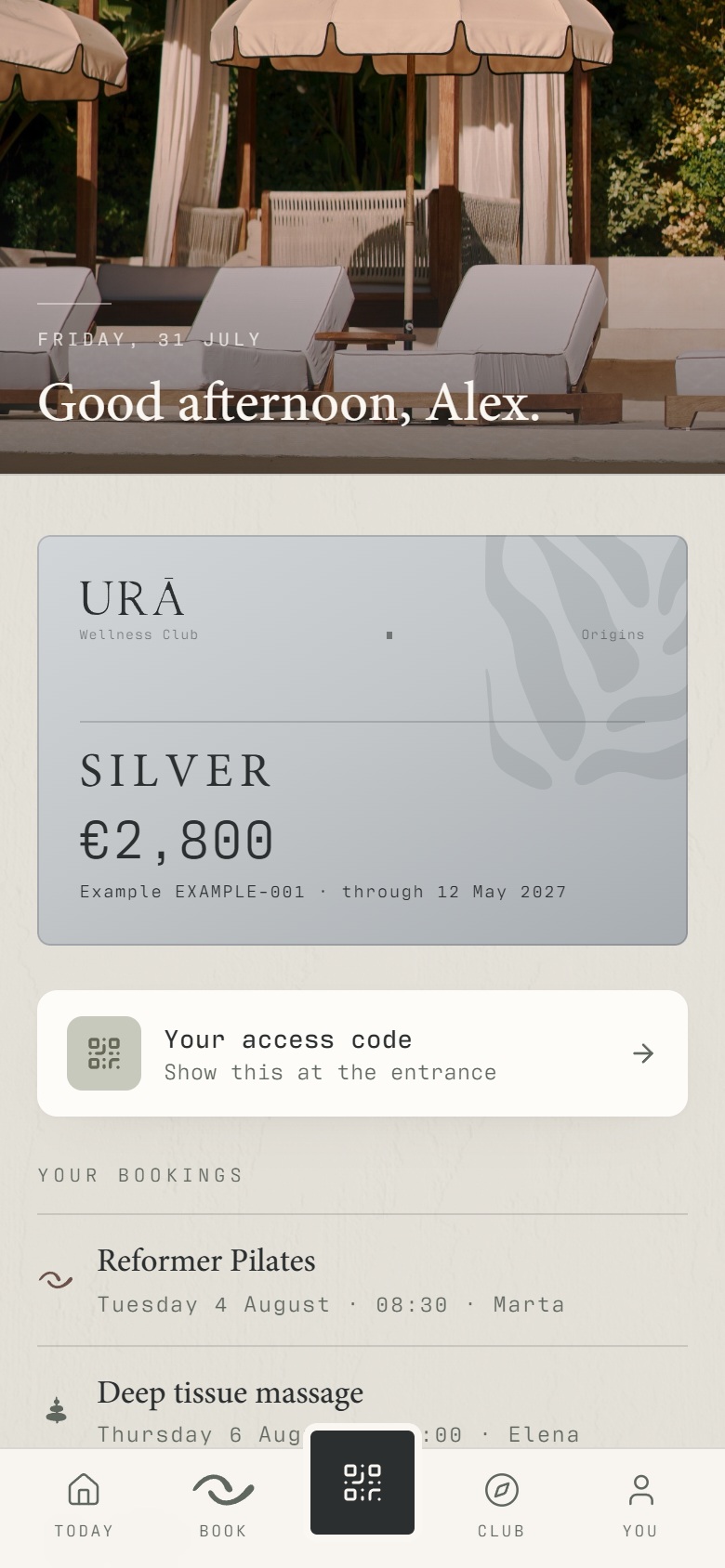
Use Today for your day, Book for classes and treatments, the centre QR button for access, Club for club information, and You for your account.
Open You → Bookings to find upcoming and past reservations.
Open You → Membership for your plan and validity, or You → Personal details to update your profile.
What should happen
You can find your next reservation, your membership and your entry QR without creating another account.
Example
Before a visit: check Bookings for the appointment, then open the centre QR button when you reach the entrance.
Screen guide
Troubleshooting
I cannot find the same menu as in the picture.
The pictures show the mobile website. In the installed app, use the tab names in the numbered instructions. Staff tools are reached through the staff area, rather than the member's You tab.
Understand the difference
- Account / access pass
- An account lets a person sign in. Club entry also depends on membership or visit validity, payment, approval and restrictions. Guests use their private browser pass rather than needing a member login.
- Plan allowance / prepaid package / courtesy
- A plan allowance is a membership benefit. A prepaid package has its own session balance. A courtesy invitation is granted at no charge. Select the correct entitlement instead of changing the membership to make a treatment fit.
Before you finish
The phone screenshots in these guides are mobile web examples. The installed iPhone app has the same core tasks, with some differences in layout.