Find a member and filter plans
Search by name or contact details and use the live plan catalogue.
Before you begin
Start with all filters cleared when checking whether an account exists. Match more than a name before editing a record.
What to do
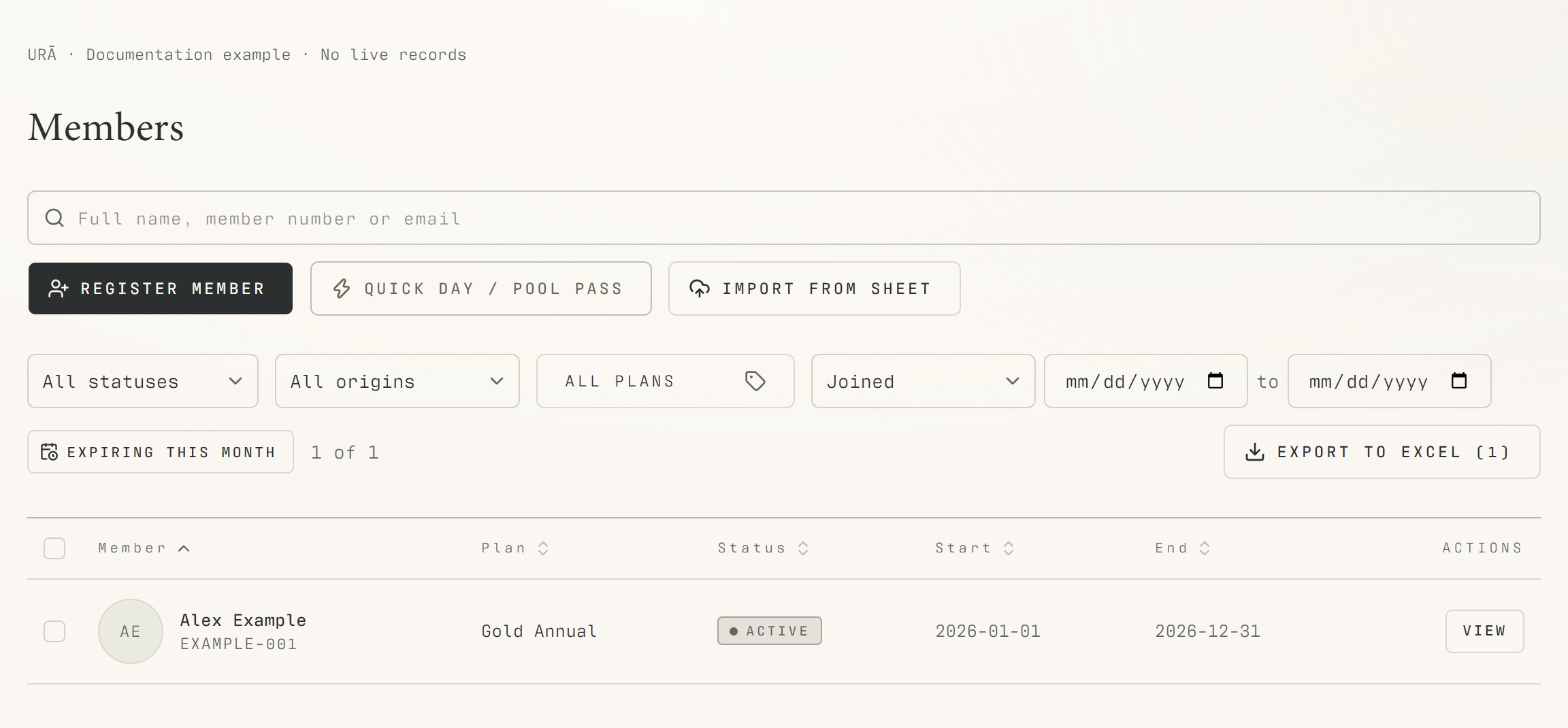
Open Members in the back office.
Type the member's name, email or identifying details into Search members.
Use status, origin and plan filters to narrow the list. The origins filter includes former SEVEN members.
Select View to open the matching person's profile.
Clear filters if a known member is missing; confirm the identity before editing.
What should happen
The selected profile matches the person's contact details and member number. Active catalogue plans appear as filter options.
Example
For a former SEVEN member, use the origin filter, then confirm the matching email and member number before opening the profile.
Screen guide
Troubleshooting
A known member is missing from the list.
Clear status, origin, plan and date filters, then search using another known identifier. An inactive plan may no longer be offered as a filter even though a historical member record still refers to it.
Understand the difference
- Account / access pass
- An account lets a person sign in. Club entry also depends on membership or visit validity, payment, approval and restrictions. Guests use their private browser pass rather than needing a member login.
- Plan allowance / prepaid package / courtesy
- A plan allowance is a membership benefit. A prepaid package has its own session balance. A courtesy invitation is granted at no charge. Select the correct entitlement instead of changing the membership to make a treatment fit.
Before you finish
The Plans filter reads the active plan catalogue. Deactivated plans should not be offered as current filter choices.