Schedule a membership freeze
Choose the start and duration and check the automatic expiry extension.
Before you begin
Check eligibility and any previous freeze. Agree the start date and duration with the member before confirming.
What to do
Open Members and the member's profile.
Find Freeze membership on an eligible active annual membership or an authorized exception.
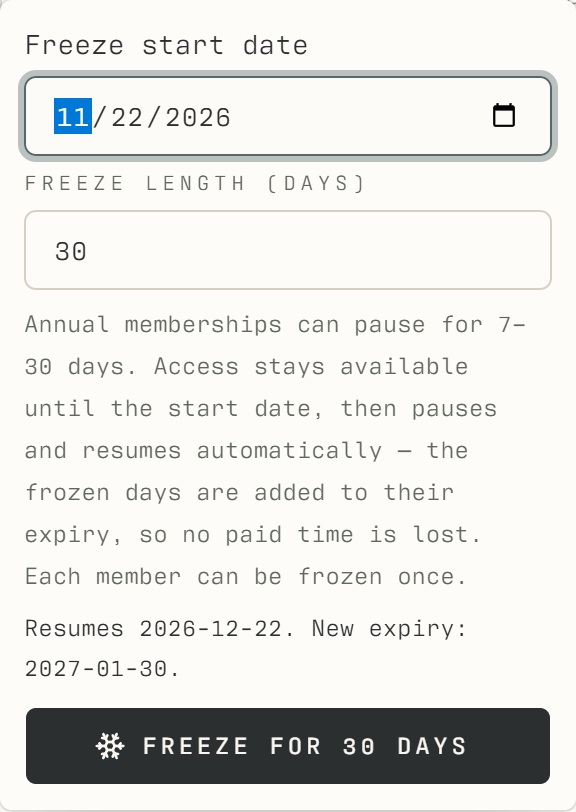
Choose the start date and a duration between 7 and 30 days.
Review the freeze dates and adjusted expiry, then confirm.
Check the frozen or scheduled status. The member cannot enter while frozen; access resumes when the freeze ends.
What should happen
The profile shows a scheduled or active freeze and the adjusted membership expiry. Access is unavailable during the frozen period.
Example
For a 30-day freeze, review the proposed dates and new expiry on screen; do not then add another 30-day extension.
Screen guide
Troubleshooting
Should I also extend the expiry manually?
No: frozen days are credited automatically. Ending the freeze early adjusts that credit. The current system permits one freeze per member, normally on eligible annual memberships, with a duration of 7–30 days.
Understand the difference
- Account / access pass
- An account lets a person sign in. Club entry also depends on membership or visit validity, payment, approval and restrictions. Guests use their private browser pass rather than needing a member login.
- Plan allowance / prepaid package / courtesy
- A plan allowance is a membership benefit. A prepaid package has its own session balance. A courtesy invitation is granted at no charge. Select the correct entitlement instead of changing the membership to make a treatment fit.
Before you finish
The current system allows one freeze per member. Frozen days are credited to expiry automatically. Ending a freeze early adjusts the credited days; do not add the same days manually.